Property Brothers Home Design
- 4.6
- Rating
- 10.00M
- Installs
- Free
- Price

 Analysis by App-foxy
I approached Property Brothers Home Design expecting a familiar decorating game, but I found something more focused than a simple room-makeover toy. It combines renovation decisions, visual styling, and a steady progression loop built around creating homes that feel finished. The appeal is easy to understand: you take an ordinary space, make a series of design choices, and gradually turn it into something that looks like your own project.
That basic idea will feel comfortable if you already enjoy simulation games with short sessions and a strong visual payoff. What makes this one worth discussing is the balance between creative freedom and guided objectives. You are not dropped into an empty design program with unlimited possibilities. Instead, the game gives you a direction, presents choices, and asks you to work within its rhythm. I found that structure helpful at first, although it also becomes the main limitation for players who want complete control.
How the renovation experience feels today
The game is developed by Storm8 Studios and sits firmly in the simulation category. Its central promise is not about managing a complicated construction business; it is about shaping living spaces through a sequence of design decisions. In practice, that makes it approachable on a phone. I could open it for a short break, complete a small piece of progress, and leave without needing to remember a huge set of systems.
You May Also Like

 Blood Strike: 2.5 Anniversary
Blood Strike’s Loadouts Turn Every Drop Into a Tactical Gamble
A close look at Blood Strike’s custom loadouts: how fast access to signature weapons reshapes its battle royale rhythm, rewards preparation, and narrows the gap between fights.

 Pandora - Music & Podcasts
Pandora’s Music Is Easy to Start, but Harder to Recover
Pandora’s strength is its low-effort path from a seed to a station. Its weak spot is how much confidence it asks you to place in connection, setup, and quiet recovery.

 8 Ball Pool
 Is Built on Rivalries, Rematches, and Routine
A close look at the rivalries, rematches, shared routines, and unanswered safety questions that turn a quick pool match into a persistent mobile community.

 Samsung Music
’s Quiet Strength Is Playing What You Already Own
Its reach comes less from spectacle than from dependable access to a personal library. That simplicity is both the app’s strongest retention engine and its ceiling.

 AccuWeather: Weather Radar
AccuWeather Review: A Quick, Clear Forecast for Everyday Decisions
For everyday plans, the best forecast is the one you can understand quickly. AccuWeather makes rain timing, radar, and local conditions easy to act on, with a few trade-offs.

 Hill Climb Racing
Why Hill Climb Racing Still Turns Crashes Into One More Run
A tiny car, a bumpy hill and one more upgrade: Hill Climb Racing keeps resurfacing because its simple chaos makes every near-miss feel personal.
More From Our News Desk
View All News


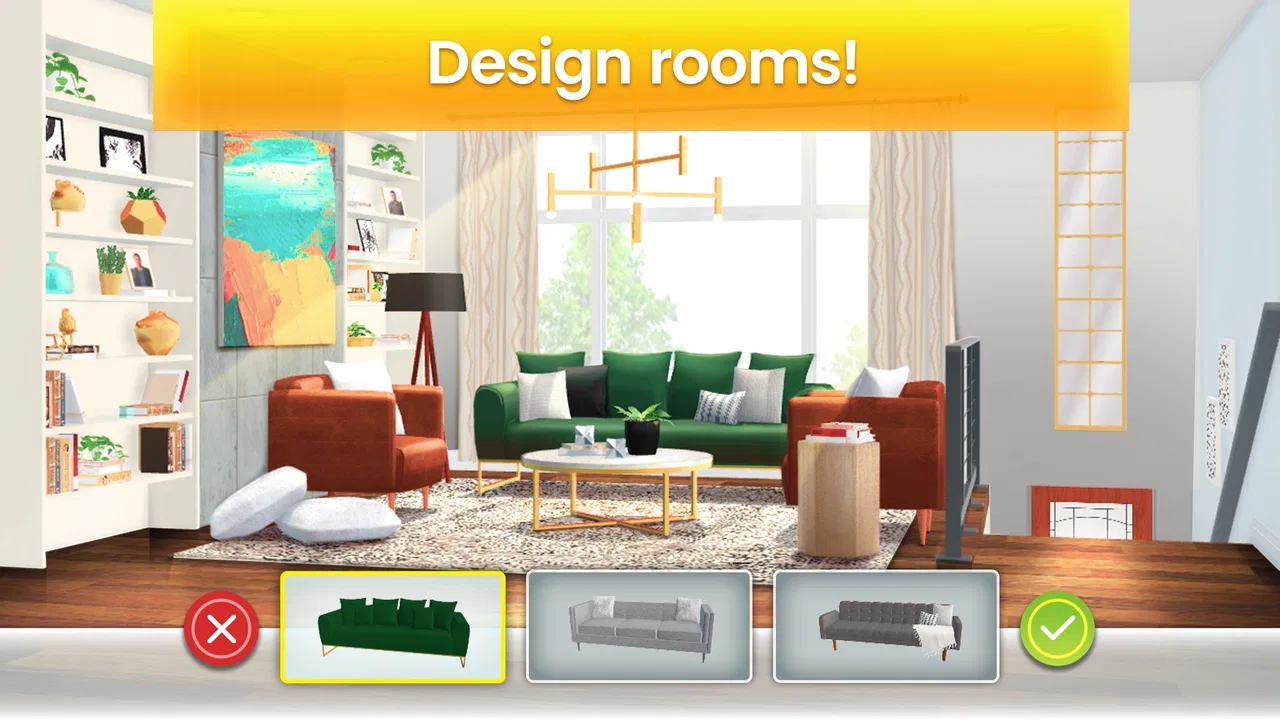
The most satisfying moments come from seeing a room change in stages. A blank or dated space starts to gain personality as furniture, finishes, and decorative choices are introduced. The visual transformation gives each task a clear purpose. Even when the underlying action is simple, the before-and-after effect makes progress feel tangible.
I also liked that the game encourages comparison between options rather than asking me to follow one correct blueprint. A choice may suit a bright, modern room, while another may create a warmer or more traditional impression. That does not turn the experience into a full interior-design simulator, but it gives decorating decisions enough meaning to keep them from feeling completely automatic.
The strongest use case is a player who enjoys visual planning but does not want the complexity of a professional design tool. You can experiment with combinations, notice how a room’s mood changes, and develop a sense of what works together. It is particularly suitable for casual play because the learning curve is gentle and the main objective remains visible.
A good fit for short, repeatable sessions
In an everyday situation, I can imagine playing during a commute, while waiting for an appointment, or after finishing a few household chores. The game works well in that setting because a renovation task has a natural stopping point. I do not need to commit to a long uninterrupted session just to make progress. That convenience is one of its practical strengths over more elaborate simulation games that demand more planning before anything meaningful happens.
At the same time, the short-session design can make the experience feel measured rather than free-flowing. If I wanted to redesign an entire home in one sitting, the progression would feel less satisfying. The game is built around returning regularly, completing steps, and gradually moving forward. Players who prefer a relaxed daily routine will probably appreciate that pace more than players looking for an open-ended creative sandbox.
The age rating is Everyone, which matches the accessible tone. Nothing about the presentation requires specialist knowledge, and the basic idea is easy to explain to a younger player or to someone who rarely plays games. That does not mean every player will enjoy it equally: the real question is whether guided decorating sounds appealing to you.
Where it differs from ordinary decorating alternatives
Compared with a pure room-planning app, this game is more structured and game-like. You are not simply arranging objects without a goal. There is a sense of progression, and the renovation context gives each design task a reason to exist. That makes it more engaging for me than an empty canvas, especially when I want a little direction.
Compared with larger life-simulation games, it is narrower. You should not choose it expecting a broad virtual world, deep character management, or a detailed economic simulation. Its attention stays on homes and the decisions involved in improving them. That narrower scope is a benefit when you want decorating without unrelated distractions, but it is a weakness if your ideal game includes many interconnected systems.
It also differs from a traditional puzzle game. The attraction is not only solving a fixed challenge as quickly as possible. The visual result matters, and the process invites personal taste. Still, the available choices and progression rules mean it is not an unrestricted design studio. I would describe it as a guided home-design game with simulation elements rather than a serious planning application.
Progression, spending, and the practical trade-offs
The game is free to install, which makes it easy to try without making an immediate commitment. Its current version is 3.9.7g, and it supports devices running Android 7.0 or later. Those details matter for anyone using an older phone or tablet: checking the operating system before downloading can save time, particularly if the device has been kept for several years.
There are in-app purchases ranging from $0.99 to $99.99 per item. I would treat that as an important part of the decision rather than a minor footnote. A free starting point is welcome, but players should be comfortable with the possibility that optional spending may sit alongside the normal progression. If you are buying the game for a child, I would review the device’s purchase controls first and make sure the payment settings match your expectations.
My advice is to decide in advance what kind of player you want to be. If you are happy to play at the intended pace, the free entry point gives you room to judge the decorating loop before spending anything. If you dislike waiting, repeating tasks, or feeling encouraged toward purchases, the experience may become frustrating even if you like the visual side.
A useful habit is to treat every design decision as part of a larger room rather than judging each item in isolation. I found that a striking piece can look less convincing when it clashes with the surrounding palette. Looking at the whole space before choosing the next option helps avoid building a room around one attractive object that does not support the overall style.
Three practical ways to get more from the design system
Choose a room mood before choosing individual decorations. Decide whether you want the space to feel calm, bright, rustic, or polished, then use that intention to filter the available options. This reduces random selections and makes the final result feel more coherent.
Use the before-and-after view as a planning tool. Instead of tapping through each upgrade immediately, pause after a major change and consider what the room still lacks. A space may need balance, warmth, or a stronger focal point rather than another decorative item.
Separate creative preference from progression pressure. If a choice does not match your taste, do not assume that the most expensive-looking option is automatically the best one. The enjoyment comes from making a room feel intentional, so I get more satisfaction when I select a consistent style rather than chasing isolated upgrades.
These habits do not transform the game into a professional design simulator, but they make the decisions feel more thoughtful. They also help players who normally lose interest in decorating games once the first few rooms stop feeling new. Giving yourself a design rule creates a small personal challenge inside the guided progression.
What existing players should know about the current version
The current version number gives the game a clear present-day reference point, but I would not treat a version label alone as proof that the experience has been radically redesigned. From a player’s perspective, the important question is whether the existing renovation loop still suits you. If you already enjoy the game, an update is most useful when it keeps your progress and familiar routines feeling comfortable while refining the overall experience.
For someone returning after time away, I would begin with a small session rather than trying to catch up all at once. Revisit the design choices, check how the progression feels, and see whether the current pacing still matches your expectations. That approach is better than assuming the game has become a completely different product simply because its version has advanced.
The game’s popularity suggests that the core idea has broad appeal: it has an average rating of 4.6 from roughly 323 thousand ratings and has passed 10 million installs. Those figures show a substantial audience, but they should not replace personal testing. A player who wants open-ended building may still find the guided structure restrictive, while a casual decorator may find exactly the right amount of direction.
The developer’s involvement also matters in a practical way. Storm8 Studios has positioned this as an accessible mobile game rather than a specialist design package, so I would judge it by how well it delivers quick, attractive renovation play. On that standard, it succeeds more often than it fails, provided I accept that the game controls the broader progression.
Where the experience still falls short
The biggest gap is freedom. I can make meaningful choices, but I am still working inside the boundaries of the game’s presented options and objectives. That is very different from choosing wall dimensions, moving every object wherever I want, or designing a complete property from an empty plot. If your enjoyment depends on unrestricted experimentation, a dedicated building or interior-planning alternative will be a better match.
The second limitation is the tension between creativity and progression. The game wants each design task to be both an artistic decision and a step in a larger reward loop. Those goals do not always align. Sometimes I want to keep refining a room because I enjoy the look, but the structure encourages me to move on. At other times, the next objective matters more than the design itself.
Spending is another point to consider carefully. The presence of purchases from $0.99 to $99.99 means the free experience may not feel identical for every player. Someone willing to wait and play casually can approach it differently from someone who wants immediate progress. I would skip this game if purchase prompts or progress limits reliably spoil your relaxation, because no amount of attractive decoration will compensate for that irritation.
I would also skip it if you want a realistic architectural workflow. This is not the right tool for testing actual floor plans, estimating renovation materials, or preparing a room for real-world construction. Its value is entertainment and visual decision-making, not professional accuracy.
Who should try it, and what to watch for
I recommend it to players who like makeover games, light simulation, and visible progress. It is especially appealing if you enjoy comparing styles and want a game that can be played in manageable sessions. It may also suit someone who likes home-improvement television but wants to participate in the decisions instead of only watching a transformation.
I would be more cautious about recommending it to players who need constant novelty, deep strategy, or total creative control. The focused home-design theme is its identity, so the same focus that makes it approachable can make it repetitive for someone seeking a broader simulation. Before committing time, ask yourself whether improving one room at a time sounds relaxing or restrictive.
Looking ahead, I would pay attention to how the game handles its balance between new design opportunities and the established progression rhythm. For existing users, the best changes would be those that add variety without making earlier progress feel irrelevant. For new users, a smooth introduction matters more than a long list of systems. I would also watch whether optional purchases remain easy to understand, since clarity around spending has a direct effect on trust.
My final impression is positive but specific. Property Brothers Home Design is strongest as a guided decorating game, not as a full construction simulator. I enjoyed the visual transformations, the low barrier to entry, and the ability to make a little progress whenever I had a spare moment. I also noticed the limits: the game’s creative space is curated, the pace may not suit everyone, and the purchase range deserves attention.
If you want a friendly simulation game that turns renovation into a series of manageable design choices, I think it is worth trying for free. Give it a few sessions, establish your own style rules, and decide whether the progression feels rewarding rather than pressured. If what you really want is unrestricted architecture or a deeper life simulation, choose a more specialized alternative instead. For casual home makeovers on a mobile screen, though, it offers a polished and approachable way to play with design.
FAQs for Property Brothers Home Design
01What is Property Brothers Home Design?
Property Brothers Home Design is a casual home renovation and puzzle game inspired by the popular Property Brothers television brand. You complete match-3-style levels to earn rewards, then use those rewards to renovate, decorate, and furnish different rooms and properties. The game combines light storytelling, design choices, and progressively more challenging puzzles in a format that is easy to understand for new players.
02How does the gameplay work in Property Brothers Home Design?
The main gameplay loop involves completing puzzle levels by matching colorful pieces and achieving specific objectives within a limited number of moves. Winning levels provides resources such as coins, stars, or other rewards, which can be spent on renovation tasks and decorative items. As you progress, new rooms, design projects, characters, and story moments become available, giving the game a steady sense of progression.
03Is Property Brothers Home Design free to download and play?
Property Brothers Home Design is generally free to download, but it includes optional in-app purchases. Players can usually enjoy the early content without spending money, although puzzle difficulty, limited moves, energy systems, or waiting periods may encourage purchases later. If children use the app, it is a good idea to review device purchase settings and enable parental controls to prevent accidental transactions.
04Can Property Brothers Home Design be played offline?
Some parts of Property Brothers Home Design may work temporarily without an internet connection, particularly previously loaded puzzle content. However, a reliable connection is normally recommended because the game may need to synchronize progress, load advertisements, validate purchases, deliver events, or download new content. Offline availability can also vary after updates, so the app should not be considered a fully offline game.
05Is Property Brothers Home Design suitable for all ages?
Property Brothers Home Design is designed as a family-friendly casual game, with colorful visuals, simple renovation themes, and non-violent puzzle gameplay. Nevertheless, it contains optional purchases and may include advertising or promotional content depending on the version and region. Younger players may also find the increasingly difficult puzzles frustrating, so adult supervision and purchase restrictions are recommended when children are playing.
Pros
- Fun home renovation gameplay with creative decorating options.
- Easy-to-learn controls make it accessible for casual players.
- Story-driven projects add personality and progression to each makeover.
- Regular challenges can provide extra goals beyond the main renovations.
- Suitable for short play sessions when you have limited free time.
Cons
- Energy limits can interrupt projects and require waiting or purchases.
- Some furniture and design choices may be locked behind in-app spending.
- Puzzle stages can become repetitive after extended play.
- Progress may feel slow without completing frequent match-three levels.
- An internet connection may be required for certain features or updates.

Property Brothers Home Design
Gallery